
MCPs: A Major Unlock for Finance Automation
Some notes on my experience building local MCP servers to automate finance workflows

The progression of using Claude in Finance looks something like this. You start in chat asking questions about accounting intricacies or maybe SaaS metrics. Then you start feeding it financial files and asking for analysis, charts, and scenario model. Then you start developing skills (or entire plugins) to automate multi-step tasks and workflows. Now you’ve got these amazing workflows (daily reconciliations, daily insight reports, A/R checks, etc.) and want to schedule them to run automatically. So you set the schedule and watch your AI do the work.

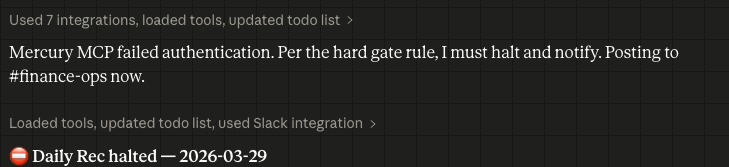
A week passes by and then all of a sudden your scheduled task stops running because of a failed authentication. No!
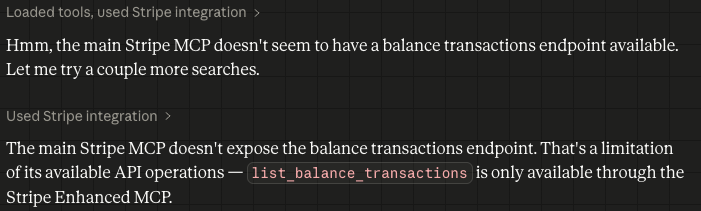
Or you might have started to try and use the MCP for more complex operations, but the MCP servers are generally exposing only a portion of the available API endpoints, so you hit a roadblock.
In many ways, these roadblocks hinder the ability to use Claude beyond prototyping, forcing you back to off-the-shelf apps or even building a production app on your own.
But there is an alternative so that you can get even more out of Claude and keep your workflows running. Build your own MCP server locally that connects directly to your vendor’s API (e.g. QBO, Ramp, Stripe). Claude Code is making this surprisingly easy:
- Provide the API documentation to Claude. Ironically, this is probably the step that takes the longest because companies are now blocking their API documentation from being read by AI. You can sometimes find it on GitHub, or you can PDF copies of the endpoints from the documentation website.
- Give the documentation to Claude and tell it to build you a local MCP server. Claude can even reference the existing published MCP to help it build your local server.
- Get your API token / secret from your application. For security purposes, it is highly recommended to only set up read-only access (or enable read-only endpoints) and whitelist your IP address. Also, set a reminder to rotate keys.
- Add your token to your Claude config file and restart Claude, and then your local MCP server is live! It is also recommended for security purposes to run MCP servers in containers (eg using Docker MCP Toolkit), but you can set that up after testing.
Running local MCP servers has been a massive unlock for me. The data flow is stable, seamless, and completely under my control without the constant authentication drops.
My first ever (as a 41-year-old CFO) contribution to GitHub was a pull request to a Quickbooks Online MCP repo, but I now have custom servers for Ramp, Stripe and Mercury that are allowing me to automate more workflows.
Once you’ve made it this far in your Claude progression it can be frustrating to run into the authentication and data limitations, but you can push your automation much further with local MCP servers while also maintaining a high level of security around your data. Custom MCP servers are the ultimate unlock as you move up the maturity curve in using Claude for finance automation.